
Most sales teams already have ChatGPT open for research, writing, and planning. Connect it to toflow.ai and it can act directly on your outreach workspace — searching for prospects, enriching contacts, enrolling them in sequences, handling inbox replies — from a natural language prompt.
This page covers how to connect ChatGPT to toflow.ai, what it can do once connected, and the workflows where the integration saves the most time.
How to connect ChatGPT to toflow.ai
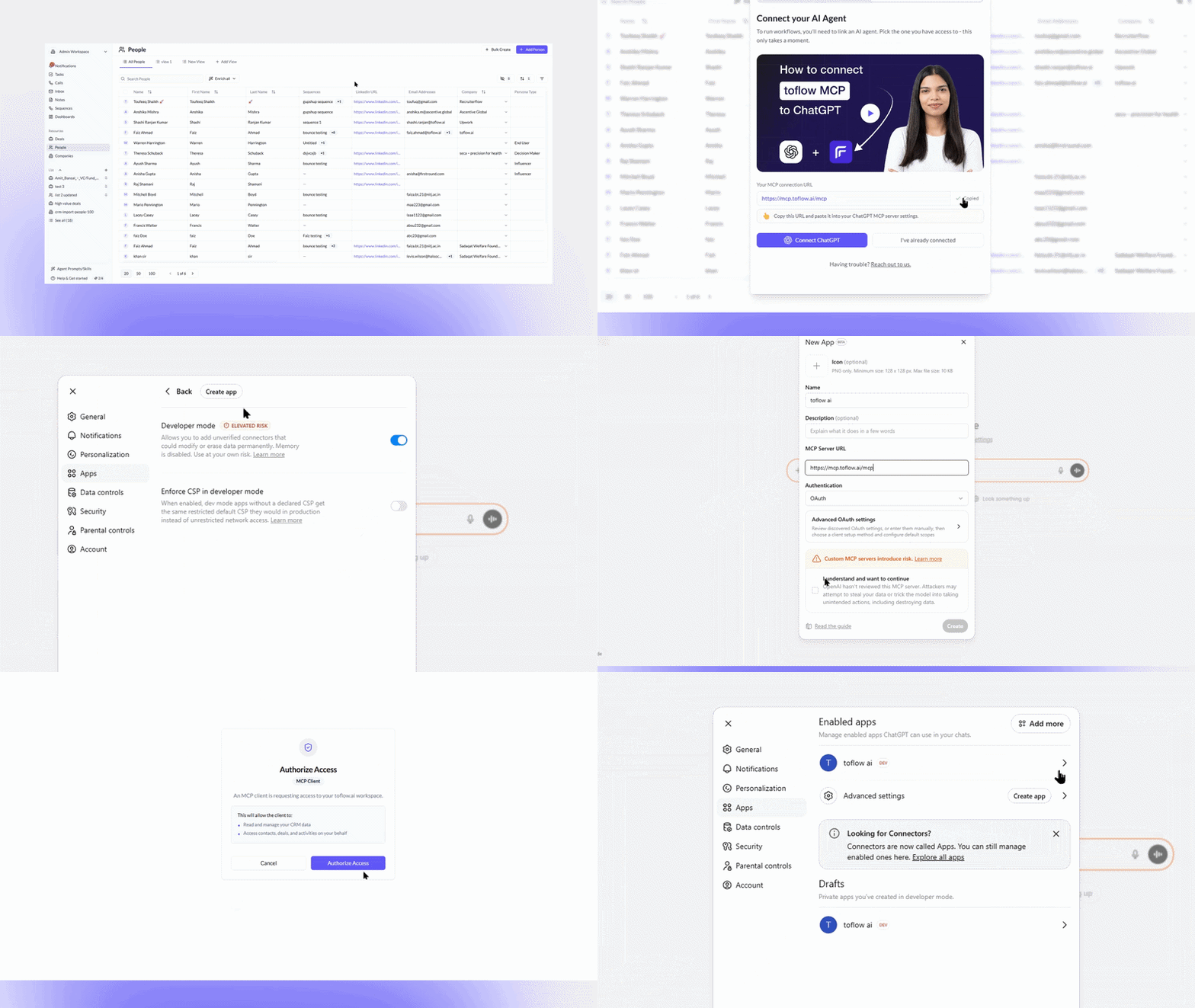
Step 1 — Open Apps
In ChatGPT Desktop, click Apps in the left sidebar.
Step 2 — Enable Developer Mode
Open Advanced Settings and turn on Developer Mode.
Step 3 — Create an app
Click Create App. Enter the name toflow ai and paste the MCP server URL:
https://mcp.toflow.ai/mcp
Step 4 — Connect and authorise
Click Connect. ChatGPT will open a browser window to the toflow.ai authorisation page. Log in if needed and click Authorise Access. OAuth 2.0 handles authentication. Tokens are valid for 90 days.
What ChatGPT can do with toflow.ai
Once connected, ChatGPT has access to over 100 tools across your toflow.ai workspace.
Prospecting
Describe your ICP and ChatGPT searches for matching contacts using LinkedIn Sales Navigator-style filters: job title, company size, industry, location, department, technologies, and funding stage. Results come back already tied to your toflow.ai workspace.
"Find heads of growth at Series A and B fintech companies in Southeast Asia with fewer than 200 employees."
Enrichment
ChatGPT enriches contact lists with verified emails, phone numbers, and LinkedIn profile data across 8+ sources. For bulk runs it shows the credit cost first and waits for your go-ahead.
"Enrich my 'June prospects' list and find verified emails for everyone missing one."
CSV uploads
Upload a spreadsheet directly in the conversation. ChatGPT reads the file, extracts LinkedIn URLs or company names, passes them through toflow.ai's enrichment, and returns the completed dataset in the same session. Useful when you get lead lists from partners or inbound sources.
"Here's a CSV of 150 LinkedIn profiles from a conference. Enrich them and find verified emails."
Personalised messaging
ChatGPT reads a prospect's recent LinkedIn posts and activity, then drafts a connection note or email that references something specific to them. The output is written from actual context, not a template with a variable swapped in.
"Read what this person has posted in the last two weeks and write a LinkedIn connection note under 300 characters that references their content."
Sequence creation
ChatGPT can build a full outreach sequence from a prompt, defining the steps, channels, timing, and copy for each touchpoint. Describe your ICP, your goal, and the channels you want to use, and ChatGPT drafts the sequence structure ready to review and activate in toflow.ai.
"Build a 5-step sequence for heads of growth at Series B SaaS companies. Start with a LinkedIn connection request, follow up with two emails, then a LinkedIn message. Write the copy for each step."
Sequence enrollment
Enroll one contact or a full list into any toflow.ai sequence from a single prompt, with personalisation applied per person based on what ChatGPT knows about each prospect.
"Enroll everyone in the 'SaaS VP Sales' list in the 5-step email plus LinkedIn sequence."
Inbox replies
ChatGPT reads incoming replies across email, LinkedIn, and WhatsApp, summarises what needs attention, and drafts follow-ups for the conversations that matter.
"Check my inbox for the last 24 hours, flag any positive replies, and draft follow-up messages to book calls."
Workflows that work well through ChatGPT
Prospecting a LinkedIn post's audience
Paste a URL of a relevant post — a competitor announcement, a report your buyers share, a thought leader in your space. ChatGPT pulls everyone who commented or reacted, filters by your ICP, enriches contact details, and adds the right people to a toflow.ai list. People who engaged with that post have already signalled something about their priorities.
End-to-end prospecting in one conversation
Describe your ICP, let ChatGPT search and filter, enrich the results, check LinkedIn connection status for each contact, and enroll the list into a sequence. Multi-step work that used to require switching between tools runs inside a single ChatGPT conversation.
Stale data cleanup
Pull a list with missing contact information into ChatGPT. Pass it through toflow.ai's bulk enrichment, confirm the credit cost, and push the updated records back. Useful for cleaning old HubSpot or Salesforce lists without a manual research project.
Reply categorisation at the start of the day
Each morning, ask ChatGPT to read your inbox, categorise replies by intent (interested, objection, wrong person, out of office), and draft responses for the ones that need follow-up. The triage that used to take 20 minutes of context switching runs in a few seconds of reading.
Book a demo to walk through the ChatGPT integration end to end.